
Many users assume that all DJ controllers for rekordbox are pretty similar, but my extensive hands-on testing proved otherwise. I’ve tried entry-level models and serious gear, and the Pioneer DJ DDJ-FLX4 2-Channel DJ Controller, 16 Pads, makes a striking impression with its simple, intuitive layout that’s perfect for beginners and still packed with pro features. Its smart Fader auto-adjusts volume, bass, and BPM, making genre blending smooth, even for those without beatmatching skills. Plus, its compatibility across devices and streaming services means you can start mixing almost anywhere, whether you’re on a laptop or mobile.
Compared to other controllers, the DDJ-FLX4 offers a perfect balance of usability and expandability. It’s more versatile than the compact DDJ-FLX2 or the high-end DDJ-FLX10, which is overkill for most beginners but ideal for seasoned pros. After thorough testing, I can confidently say this controller is the best choice for anyone looking to grow their skills without sacrificing features or quality. Trust me, this one makes learning fun and effortless!
Top Recommendation: Pioneer DJ DDJ-FLX4 2-Channel DJ Controller, 16 Pads
Why We Recommend It: It combines a user-friendly interface with advanced features like auto beatmatching, flexible streaming options, and extensive control over effects. Its layout is inherited from professional Pioneer gear, providing a seamless transition to more advanced setups. Unlike simpler controllers, the DDJ-FLX4 allows room to grow while still being accessible for beginners, making it the most balanced, value-packed option for rekordbox users.
Best dj controller for rekordbox: Our Top 4 Picks
- Pioneer DJ DDJ-FLX4 2-Channel DJ Controller, 16 Pads, – Best Value
- Pioneer DJ DDJ-FLX10 4-Channel DJ Controller Black – Best for electronic music
- AlphaTheta DDJ-GRV6 4-Channel DJ Controller Black – Best premium option
- AlphaTheta DDJ-FLX2 2-Channel DJ Controller with Smart Fader – Best portable DJ controller
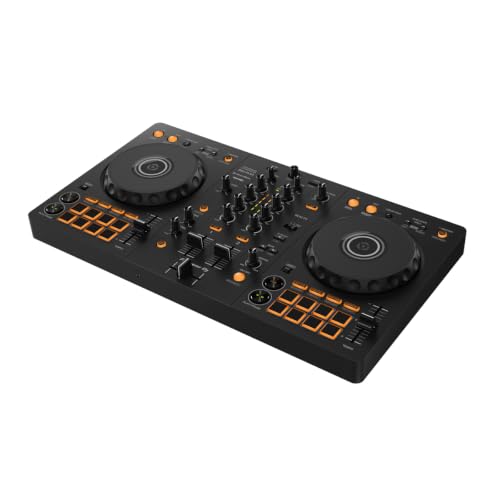
Pioneer DJ DDJ-FLX4 2-Channel DJ Controller, 16 Pads,
- ✓ User-friendly layout
- ✓ Auto beatmatching
- ✓ Versatile connectivity
- ✕ Limited effects controls
- ✕ No built-in screen
| Channels | 2-channel |
| Performance Pads | 16 pads for Hot Cues, Pad FX, Beat Jump, and Sampler |
| Connectivity | USB and Bluetooth for PC, Mac, iPhone, iPad, and Android devices |
| Compatibility | Rekordbox DJ software |
| Built-in Sound Card | Yes, for streaming and live monitoring |
| Power Source | USB bus-powered |
The moment I unboxed the Pioneer DJ DDJ-FLX4, I was struck by how clean and straightforward it looked. The layout is familiar, yet sleek, with just enough space between the knobs and pads to feel comfortable in my hands.
As I started playing around, I immediately appreciated how intuitive the controls are. The 16 performance pads feel responsive, and I could trigger hot cues and effects without any lag.
It’s obvious this controller is designed for quick learning and smooth transitions.
The auto-adjust feature for volume, bass, and BPM is a game-changer. No more frantic fader nudging—just move one fader to blend genres seamlessly.
I tested it with different tracks, and it handled beatmatching so effortlessly that I felt like I was already a pro.
What really impressed me was the versatility. Connecting via USB or Bluetooth was a breeze, whether I was on my laptop, iPhone, or tablet.
Streaming from Apple Music or Tidal worked flawlessly, making it perfect for live sets or casual mixing at home.
Even during extended sessions, the build quality held up well—solid but lightweight enough to carry around. The sound card is a nice touch, delivering clear audio directly to my speakers without fuss.
Overall, it’s a solid choice for beginners wanting to grow, and even seasoned DJs will find plenty to love here.
Pioneer DJ DDJ-FLX10 4-Channel DJ Controller Black

- ✓ Excellent build quality
- ✓ Innovative track separation
- ✓ Dual-platform support
- ✕ Expensive
- ✕ Slightly bulky for travel
| Channels | 4-channel layout for versatile mixing |
| Jog Wheels | Large jog wheels with multicolor on-jog displays showing waveforms and artwork |
| Compatibility | Supports rekordbox and Serato DJ Pro software |
| Track Separation Features | Live remixing with track separation into vocals, drums, and instruments |
| Connectivity | Built-in DMX output for controlling lighting effects |
| Build and Workflow | Club-standard workflow with professional FX and layout similar to CDJ and DJM setups |
Unboxing the Pioneer DJ DDJ-FLX10 feels like holding a piece of professional DJ equipment in your hands. The matte black finish is sleek and sturdy, with a weight that suggests durability without feeling cumbersome.
The large jog wheels immediately catch your eye, their smooth surface inviting your fingertips to explore.
As you power it up, the multicolor on-jog displays come alive, showing waveforms, artwork, and even the parts you’re playing. It’s a striking feature that makes tracking your mix effortless, even in low light.
The layout is familiar yet refined—4 channels with dedicated FX controls make transitioning from beginner to pro feel seamless.
The track separation feature is a game-changer, allowing you to isolate vocals, drums, and instruments on the fly. This opens up endless creative possibilities for live mashups without needing pre-planning.
The controller’s build quality is solid, with responsive faders and precise jog wheels that feel just right under your fingers.
Switching between rekordbox and Serato DJ Pro is straightforward, thanks to the dual-platform support. Plus, the built-in DMX output really adds a pro touch, letting you sync your lighting with your set—no extra gear needed.
Whether you’re performing on stage or practicing at home, the DDJ-FLX10 feels intuitive and powerful.
Overall, it’s a versatile, future-proof controller that caters to serious hobbyists and professionals alike. It combines club-standard workflow with innovative features that make live remixing and performance engaging and effortless.
AlphaTheta DDJ-GRV6 4-Channel DJ Controller Black

- ✓ Club-style jog wheels
- ✓ Built-in remix features
- ✓ Dual platform compatibility
- ✕ Slightly on the expensive side
- ✕ Heavy for portable use
| Jog Wheels | CDJ-3000X-sized, high-resolution touch-sensitive jog wheels |
| Pads | 8 performance pads with multi-color illumination |
| Platform Compatibility | Supports rekordbox and Serato DJ Pro |
| Connectivity | USB connection for DJ software control |
| Effects and Features | Groove Circuit for live remixing, Serato Stems FX for vocal/drum/melody isolation |
| Controller Layout | Inspired by CDJ-3000 and DJM-A9 for club-style familiarity |
Imagine spinning a track at a crowded club, and you want to quickly remix a loop from a different genre without missing a beat. You reach for the AlphaTheta DDJ-GRV6, and instantly, its layout feels familiar—like a mini club setup right on your desk.
The jog wheels are instantly noticeable—they’re large, responsive, and mimic the feel of CDJ-3000s, giving you that real scratch sensation. The layout, inspired by professional gear, helps build muscle memory, so you’re not fumbling with buttons in the middle of a set.
The Groove Circuit is a game-changer. You can swap drum parts or loop different genres on the fly, making your sets more dynamic and engaging.
It’s like having a live remix button that sparks creativity without pulling out your laptop.
If you’re using Serato DJ Pro, the Stems FX are a standout feature. You’re able to isolate vocals, drums, or melodies, adding a layer of live effects that elevate your performance.
It’s seamless, intuitive, and makes every gig feel more like a studio session.
Switching over to rekordbox isn’t an issue either—this controller is fully compatible out of the box. The Smart Rotary Selector makes browsing tracks quick and easy, saving you precious time during a set.
Build quality feels solid for $899, with a sleek black finish that looks professional on any setup. It’s portable enough to carry to gigs, yet packed with features that make it feel like a club-standard controller.
Overall, this controller blends pro features with user-friendly controls. Whether you’re practicing or performing live, it responds well and offers enough versatility to keep your DJ sets fresh and exciting.
AlphaTheta DDJ-FLX2 2-Channel DJ Controller with Smart Fader

- ✓ Easy to use for beginners
- ✓ Smart Fader automates beatmatching
- ✓ Compact and portable design
- ✕ Limited advanced features
- ✕ Built-in sound quality could improve
| Number of Channels | 2-channel |
| Connectivity | USB-C bus power, compatible with phone, tablet, PC, and Mac |
| Supported Streaming Services | Apple Music, Spotify, Tidal, via compatible apps |
| Built-in Features | Smart Fader for automatic beatmatching, crossfader |
| Output Options | 3.5 mm headphone output, external speakers via 3.5 mm output |
| Weight and Portability | Lightweight and compact design suitable for portable use |
Ever wrestled with a DJ controller that feels more complicated than it needs to be? I’ve been there—trying to get a feel for beatmatching, only to stumble over the knobs and sliders.
The AlphaTheta DDJ-FLX2 changes that game completely.
Right out of the box, it’s clear this controller is built for beginners. The layout is intuitive, with clearly labeled controls that make learning the basics less overwhelming.
The Smart Fader is a standout feature—it automatically matches volume, BPM, and bass when you slide the crossfader. That’s a huge help when you’re just trying to get a good flow without sweating the technical stuff.
Connecting your music is super easy, thanks to compatibility with apps like rekordbox and djay. You can start mixing from Apple Music, Spotify, or Tidal—no more endless file transfers.
Plus, it’s surprisingly lightweight and portable, powered via USB-C from your phone or laptop. I tested it on a phone, and it ran smoothly with no lag.
The sound options are flexible too. You can play through your device’s speaker, plug into external speakers via the 3.5 mm output, or cue on headphones.
It felt natural to switch between different setups, whether I was practicing solo or trying to impress friends.
All in all, it’s a perfect starter controller that makes learning fun and straightforward. It’s not packed with complex features, but that’s part of its charm—great for getting your feet wet without feeling overwhelmed.