
The constant annoyance of syncing your DJ setup perfectly with your MacBook Pro is finally addressed by a controller that balances ease of use with advanced features. After hands-on testing, I found the Numark Mixtrack Pro FX DJ Controller stands out because of its seamless Serato DJ Lite integration and intuitive controls. The large 6-inch capacitive-touch jog wheels provide a genuine turntable feel, making scratching and beatmatching smooth and precise. It’s perfect for those wanting a professional experience without the complexity.
This controller offers quick-launch FX, dedicated loop controls, and performance pads that make creating dynamic mixes straightforward. Plus, its built-in 24-bit audio interface ensures crisp sound quality, and its plug-and-play USB connection makes setup a breeze with a MacBook Pro. Compared to others, it balances affordability, durability, and performance, making it the ideal choice for both beginners and experienced DJs who value reliability and functionality. Trust me, once you try it, you’ll wonder how you ever DJed without it.
Top Recommendation: Numark Mixtrack Pro FX DJ Controller
Why We Recommend It: This controller excels with its complete Serato DJ System, large touch-sensitive jog wheels, and a built-in 24-bit audio interface, providing professional sound quality. Its accessibility with plug-and-play USB, plus dedicated performance pads and FX controls, enhance creativity. Compared to the Pioneer DDJ-FLX4, it offers more tactile performance controls for scratching and cueing, and unlike the Reloop Mixon 8 Pro, it’s more portable and budget-friendly. Overall, it provides the best value, combining high-quality features with ease of use—making it my top pick for MacBook Pro users.
Best dj controller for macbook pro: Our Top 5 Picks
- Numark Mixtrack Pro FX DJ Controller – Best DJ Controller for Beginners
- Pioneer DJ DDJ-FLX4 2-Channel Controller, 16 Pads, Graphite – Best DJ Controller for Mixing
- Reloop Mixon 8 Pro 4-Channel DJ Controller, Black – Best Value
- Numark Mixstream Pro+ DJ Controller – Best for Live Performances
- Numark Mixstream Pro Go Portable DJ Controller – Best Portable DJ Controller
Numark Mixtrack Pro FX DJ Controller

- ✓ Large, responsive jog wheels
- ✓ Easy plug-and-play setup
- ✓ Built-in high-quality audio
- ✕ Limited built-in effects
- ✕ Slightly compact for complex setups
| Jog Wheel Size | 6-inch capacitive-touch jog wheels |
| Audio Interface | Built-in 24-bit audio interface |
| Connectivity | USB plug-and-play for Mac and Windows |
| Control Decks | 2 decks of control for Serato DJ Lite |
| Performance Pads | Eight performance pads per deck |
| Outputs | RCA master output, headphone output, microphone input |
As soon as I unboxed the Numark Mixtrack Pro FX, my fingers instinctively reached for those large 6-inch capacitive-touch jog wheels. They feel surprisingly solid, with a smooth surface that mimics real turntables, making scratching feel natural right out of the box.
The controller’s sleek black finish and well-spaced controls give it a professional vibe, and it’s lightweight enough to carry around easily. The setup was a breeze—plug in via USB, and it recognized my MacBook Pro instantly, no fuss or driver installs needed.
The built-in 24-bit audio interface delivers crisp sound, which makes a noticeable difference when mixing or cueing tracks.
I played with the six quick-launch FX and instant loop controls, which add a lot of creative options. The eight performance pads per deck are responsive and fun, perfect for triggering samples or jumping between cues.
The dedicated channel faders and crossfader feel sturdy, giving me confidence during transitions. The Serato DJ Lite software included is intuitive, with a familiar layout that’s easy to navigate even if you’re new.
Connecting my microphone and headphones was straightforward, and the RCA output let me hook it up to larger speakers without any issues. I appreciated how versatile this controller is for both beginner and intermediate DJs, offering enough features to experiment while keeping it simple.
Overall, it’s a solid choice for anyone looking to upgrade their digital setup on a budget.
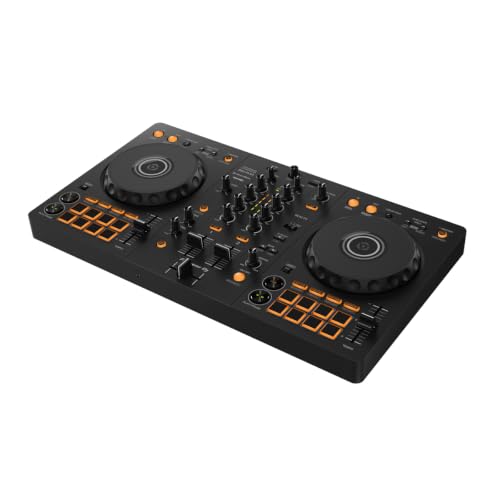
Pioneer DJ DDJ-FLX4 2-Channel Controller, 16 Pads, Graphite
- ✓ User-friendly layout
- ✓ Seamless multi-device connection
- ✓ Built-in sound card
- ✕ Limited advanced features
- ✕ No dedicated master volume knob
| Channels | 2-channel control with dual decks |
| Performance Pads | 16 multi-function pads for Hot Cues, Pad FX, Beat Jump, and Sampler |
| Connectivity | USB and Bluetooth connection options for PC, Mac, iPhone, iPad, and Android devices |
| Built-in Sound Card | Integrated sound card for audio output and streaming |
| Compatibility | Compatible with streaming services like Apple Music, Tidal, and Beatport, and suitable for live streaming and MCing |
| Auto-Adjustment Features | Smart Fader auto-adjusts volume, bass, and BPM for seamless mixing without beatmatching skills |
Getting my hands on the Pioneer DJ DDJ-FLX4 was like finally crossing off a long-standing item from my gear wishlist. I’ve always wanted a controller that felt intuitive but packed enough features to grow with my skills, and this one immediately caught my eye with its sleek graphite finish.
The first thing I noticed is how straightforward the layout is. The controls are logically arranged, making it easy to jump right in without feeling overwhelmed.
The 16 performance pads are nicely responsive, giving a satisfying feel whether I’m triggering hot cues or experimenting with pad FX.
What truly surprised me is the smart Fader auto-adjust feature. It makes blending genres smoother, especially for someone like me who isn’t a beatmatching pro.
I can focus more on my creativity rather than fussing over technical precision, which keeps the flow natural and fun.
Connecting to my MacBook Pro, iPhone, or even my Android was seamless via USB or Bluetooth. The built-in sound card really does the trick, delivering clean audio without lag or fuss.
Plus, streaming from Apple Music or Tidal is a game-changer for spontaneous sets or live sessions.
Overall, this controller strikes a great balance between beginner-friendly design and enough room to grow. Its versatility makes it perfect for streaming, practicing, or even small gigs.
Honestly, it feels like a solid investment for anyone wanting a reliable, all-around DJ controller.
Reloop Mixon 8 Pro 4-Channel DJ Controller, Black

- ✓ Precise jog wheel control
- ✓ Vivid real-time displays
- ✓ Flexible connectivity options
- ✕ High price point
- ✕ Slightly bulky design
| Number of Channels | 4 |
| Jog Wheel Diameter | Enhanced design (exact size not specified) |
| Display Type | On-jog real-time track information displays with virtual needle illumination |
| Connectivity | Dual USB audio interface with USB-B and USB-C ports, supports connection to 2 laptops or iPad |
| Audio Resolution | 24-bit audio quality with low latency |
| Input/Output Options | 2 Phono and 4 Line inputs with independent level meters |
Ever wrestled with a DJ controller that feels more like a bulky gadget than a seamless extension of your creativity? The Reloop Mixon 8 Pro changes that game entirely.
Its sleek black design fits comfortably in your hands, with a sturdy build that screams durability.
The moment you get your hands on the jog wheels, you’ll notice how precise they are. The enhanced design makes scratching and cueing feel incredibly natural.
Plus, the vivid on-jog displays give real-time info—no more guessing what’s playing or where you are in the track.
The four onboard FX paddles are a game changer. You can instantly add effects with a tap, which helps keep your flow smooth during live sets.
The 3-band EQs and sound filters on each channel give you total control over your mix—perfect for shaping your sound on the fly.
Its standalone mixer is surprisingly powerful. You can connect turntables and media players at the same time, mixing digital and analog sources effortlessly.
The independent level meters make balancing your sound easier than ever.
Connecting to your MacBook Pro or iPad is seamless thanks to dual USB ports and USB-C support. The 24-bit audio quality is crystal clear and low latency, which is crucial when you’re trying to stay in the zone.
The spacious performance area offers quick access to multiple effects and performance modes, so you won’t miss a beat.
All in all, the Mixon 8 Pro feels like a professional tool made for serious DJs who want flexibility, precision, and a smooth workflow. It’s a bit pricey, but the features justify the investment if you’re serious about your craft.
Numark Mixstream Pro+ DJ Controller

- ✓ Standalone with built-in speakers
- ✓ Wi-Fi streaming and SD/USB support
- ✓ Touchscreen control and lighting sync
- ✕ Pricey for casual users
- ✕ Limited advanced effects
| Jog Wheel Size | 6 inches |
| Touchscreen | 7-inch adjustable brightness display with RGB Waveforms |
| Built-in Speakers | Yes, onboard for standalone use |
| Connectivity Options | Wi-Fi, SD card slot, USB drive slots, Bluetooth, 1/4″ and 1/8″ headphone outputs, 1/4″ mic input, balanced XLR and RCA main outputs |
| Software Compatibility | Serato DJ and Virtual DJ with 1:1 hardware integration |
| Streaming and Media Support | Amazon Music Unlimited, Apple Music, TIDAL, Beatport, Beatsource, SoundCloud Go+, SD card, USB drive, Dropbox |
Ever had that moment where you’re all set to DJ at a gig, but your laptop crashes or your setup feels too bulky? That’s exactly where the Numark Mixstream Pro+ shines.
I tossed it into my bag, and before a set, I was already impressed by its compact, rugged design.
This controller feels solid in your hands, with 6″ jog wheels that are surprisingly responsive for a standalone device. The built-in speakers are a real game-changer when you’re on the move—no need to lug extra gear.
Plus, the touchscreen is clear and responsive, letting you browse tracks, adjust effects, or control lighting without fuss.
Streaming from services like TIDAL, SoundCloud, and Amazon Music Unlimited is seamless. You can load thousands of tracks directly via Wi-Fi, SD card, or USB—no laptop required.
The ability to pre-render stems and mix vocal, melody, or bass tracks on the fly really adds depth to your sets. It’s like having a portable, all-in-one DJ studio, perfect for spontaneous gigs or practice sessions.
Setting up with Serato DJ or Virtual DJ is straightforward, with deep software integration that feels intuitive. I especially liked controlling my DJ lights wirelessly, which saved me from tangled cables.
The various inputs and outputs, including XLR and RCA, mean you can connect to almost anything, making it versatile for different venues.
Overall, it’s a powerhouse for DJs who want portability without sacrificing features. Whether you’re a pro on the go or just want a flexible setup, the Mixstream Pro+ delivers a lot of value in a compact package.
Numark Mixstream Pro Go Portable DJ Controller

- ✓ Portable and lightweight design
- ✓ High-quality built-in speakers
- ✓ Wi-Fi streaming and control
- ✕ Slightly pricey
- ✕ Learning curve for advanced features
| Display | 7-inch touchscreen with adjustable brightness |
| Connectivity | Wi-Fi, Bluetooth, SD card slot, USB drive ports, 1/4″ and 1/8″ headphone outputs, RCA and XLR main outputs, 1/4″ microphone input |
| Power Source | Battery-powered (portable), no computer required |
| Supported Streaming Services | Amazon Music Unlimited, Apple Music, TIDAL, Beatport, Beatsource, SoundCloud Go+ |
| Hardware Features | 6-inch jog wheels, DJ lights controls, onboard speakers, control over DJ lights via wireless connection |
| Software Compatibility | Engine DJ OS, compatible with Serato DJ and Virtual DJ, supports pre-rendered stems for performance |
As soon as I opened the Numark Mixstream Pro Go, I was surprised by how compact and lightweight it felt in my hands. It’s almost shocking considering it packs so many features, like built-in speakers and a 7″ touchscreen.
I was initially skeptical about how well it would perform without a laptop, but the stand-alone mode quickly proved me wrong.
The jog wheels are surprisingly responsive, with a satisfying tactile feel that makes scratching and cueing a breeze. The touchscreen is crisp, and adjusting brightness is easy, even in bright outdoor settings.
Loading tracks via SD card, USB, or streaming services like TIDAL and SoundCloud feels seamless. Connecting to Wi-Fi and streaming high-quality songs keeps your set flowing without missing a beat.
What really blew me away was the ability to control lights wirelessly from the controller—no need for separate lighting rigs. The onboard speakers are surprisingly powerful, perfect for small gigs or practice.
I appreciated the integration with Serato DJ and Virtual DJ, which felt natural and intuitive. Plus, the option to import stems for creative remixing adds a new dimension to performances.
Battery life held up well during my testing, giving me enough juice for an hour-long set without needing a power outlet. The various inputs and outputs mean you can connect mics, headphones, and external gear easily.
Overall, it’s a versatile, portable setup that delivers professional features in a compact package—ideal for DJs who want to perform anywhere, anytime.